The GA4 vs B2B visitor tracking tool question comes up the moment a marketing or RevOps team realizes they can see traffic numbers going up but still can’t say which companies are actually visiting their site. Both tools report on website visitors, but they answer fundamentally different questions. And most B2B teams who ask “GA4 vs B2B visitor tracking tool. Which one do we need” eventually discover the honest answer is both, doing different jobs.
GA4 was built as a privacy-first, user-level behavioral analytics platform. It’s excellent at telling you how traffic moves through your site, which pages convert, and how channels perform in aggregate. What it was never built to do is tell you that “Acme Manufacturing” visited your pricing page three times last week. GA4’s identity model runs on cookies, device IDs, and modeled users, with no company-level or firmographic data in its schema at all.
A B2B visitor tracking tool exists specifically to close that gap. Tools like Leadfeeder (Dealfront), Clearbit, RB2B, and Warmly use reverse-IP lookups and firmographic databases to match anonymous traffic back to real companies. Sometimes even named individuals — and push that into your CRM or sales team’s inbox. Industry data suggests these tools can identify somewhere between 30% and 65% of B2B website traffic at the company level, depending on the vendor and the visitor’s network setup.
This piece walks through what each tool actually does, where they genuinely overlap. Since this is a GA4 vs B2B visitor tracking tool decision most teams face eventually. Which one (or both) actually fits your stage and budget.
What Is a B2B Visitor Tracking Tool?
A B2B visitor tracking tool is software that identifies the companies (and sometimes individuals) behind otherwise anonymous website traffic. Using reverse-IP matching, firmographic databases, or cookie-based deterministic identification. Instead of reporting “214 sessions from the pricing page,” it reports “someone from Acme Manufacturing viewed your pricing page three times this week,” often pushed directly into a CRM or Slack alert for sales follow-up.
This is a fundamentally different job than GA4 performs. GA4 is a web analytics platform measuring aggregate behavior across a property. A B2B visitor tracking tool is an identification and sales-activation layer sitting on top of — or alongside — that traffic data.
Why Does the GA4 vs B2B Visitor Tracking Tool Decision Matter for B2B Businesses?
It matters because the two tools serve different teams with different jobs to do, and picking only one usually leaves a real gap. Marketing needs GA4’s aggregate behavioral data to understand channel performance, conversion paths, and content effectiveness across the whole funnel. Sales and RevOps need company-level identification to know which specific accounts are showing buying intent right now. So they can follow up before the lead goes cold.
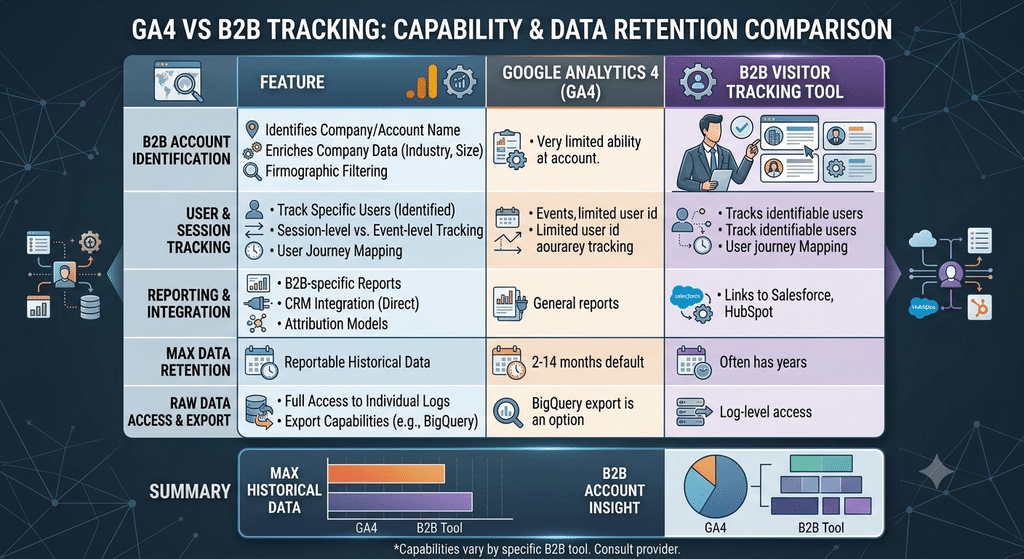
The GA4 vs B2B visitor tracking tool framing also matters because of a structural limitation in GA4 itself: its default data retention is just 2 months, with a maximum of 14 months even when manually extended, according to Google’s own documentation. For a B2B company with a 6-to-12-month sales cycle, that means GA4 can structurally lose visibility into a prospect’s early-stage research activity before the deal ever closes.
How Is GA4 Different From a B2B Visitor Tracking Tool in Practice?
In practice, GA4 tells you what happened on your site in aggregate. A B2B visitor tracking tool tells you who, at the company level, is behind specific visits. GA4’s reporting lives in dashboards and explorations built for analyzing trends across thousands of sessions. It was not designed to surface a single company’s visit as an actionable sales signal.
A visitor tracking tool, by contrast, is built to be noisy in a useful way: it’s meant to interrupt a salesperson’s day with “this target account just visited your pricing page,” not to sit in a quarterly reporting dashboard. That difference in design intent is really the core of the GA4 vs B2B visitor tracking tool comparison. One is built for marketing analysis, the other for sales activation.
| Capability | GA4 | B2B Visitor Tracking Tool |
|---|---|---|
| Identifies specific companies | No — by design, no firmographic data in its schema | Yes — typically 30%–65% of traffic matched to a company |
| Data retention | 2 months by default, 14-month maximum | Varies by vendor, often longer and CRM-synced |
| Primary output | Aggregate trends, funnels, channel attribution | Named-account alerts routed to sales/CRM |
| Typical owner | Marketing / analytics team | Sales / RevOps team |
Which Tools and Platforms Power B2B Visitor Identification?
The B2B visitor tracking category includes several distinct approaches worth knowing before you buy. Leadfeeder (now part of Dealfront) and Clearbit Reveal use reverse-IP lookup to match a visitor’s network to a company database. Which works well for office-based traffic but less reliably for remote or mobile visitors. Newer entrants like RB2B and Warmly layer in cookie-based and identity-resolution techniques to also attempt person-level identification, not just company-level.
On the GA4 side, most B2B teams don’t run it alone. They pair it with a customer data platform or a tool like HubSpot or Salesforce to stitch web behavior to CRM records. Since GA4 was never designed to own that connection natively. The GA4 vs B2B visitor tracking tool decision, in that sense, often resolves into “GA4 plus a visitor ID layer” rather than a strict either/or choice.
What Are the Risks and Compliance Considerations to Know?
Both tools carry real privacy and compliance considerations that are easy to overlook in the excitement of “finally seeing who’s on our site.” GA4 itself has faced regulatory scrutiny in Europe. Multiple EU data protection authorities, including Austria’s and France’s, ruled in 2022 that GA4’s data transfer practices violated GDPR. Specifically around storing EU user data on U.S. servers.
B2B visitor identification tools carry a different risk: identifying named individuals, not just companies. Can trigger additional consent and disclosure obligations under GDPR in the EU and under CCPA/CPRA for California residents, depending on how deterministic the identification is. Any team evaluating the GA4 vs B2B visitor tracking tool question should route the final decision through legal or compliance review. Not just marketing or sales, before turning on person-level identification specifically.
FAQ
What is a B2B visitor tracking tool and why does it matter for B2B businesses?
It’s software that identifies the companies (and sometimes individuals) behind anonymous website traffic. Typically via reverse-IP or identity-resolution matching, and routes that data to sales teams for follow-up. It matters because GA4 alone can’t tell you which specific accounts are showing buying intent, which is often the exact signal a B2B sales team needs most.
How do I choose the right visitor tracking tool within my budget?
Start by deciding whether you need company-level identification only (cheaper, broadly available) or person-level identification (pricier, with more compliance overhead). Compare vendors on their actual match-rate data for traffic similar to yours. Not just marketing claims, and confirm how cleanly the tool integrates with your existing CRM.
What checks should I do before adopting a B2B visitor tracking tool?
Confirm the vendor’s data sourcing and compliance posture under GDPR and CCPA. Especially if the tool identifies named individuals rather than just companies. Ask for a trial period against your real traffic to see actual match rates. Since identification accuracy varies significantly by industry and visitor network setup.
How long does it take to implement, and what does it cost?
Most B2B visitor tracking tools can be installed and generating leads within a few days to two weeks. Since implementation is typically a single tracking script plus a CRM integration. Pricing commonly ranges from a few hundred dollars per month for smaller traffic volumes to low five figures annually for larger sites with CRM and outreach automation built in.
Set Up the Right Visibility Stack With MyB2BNetwork
Whether the right answer to the GA4 vs B2B visitor tracking tool question is “both” or “just one for now,” picking and implementing the right combination is easier with a partner who’s set this up before. MyB2BNetwork connects marketing and RevOps leaders with vetted analytics and MarTech implementation partners who can configure GA4, layer in a visitor identification tool, and connect both cleanly to your CRM.
Explore our MarTech implementation partners to compare vendors on setup experience and pricing, or read our related piece on fractional marketing leadership if you need strategic direction on which signals to act on, not just the tooling to capture them.
How to Source a B2B Visitor Tracking Tool or Analytics Partner in the U.S.
Companies evaluating the GA4 vs B2B visitor tracking tool question show up across every B2B hub — SaaS startups in San Francisco layering Clearbit onto GA4, fintech firms in New York building CRM-synced visitor alerts, and manufacturing companies in Ohio using simpler reverse-IP tools to catch long-cycle research activity GA4 would otherwise lose track of. Two things matter most before you commit budget.
How to choose a vendor within budget. Filter first by whether you need company-level identification alone or person-level identification, since the latter costs more and carries more compliance overhead. Entry-level company-identification tools typically start in the low hundreds of dollars per month; full-featured platforms with person-level identification, CRM sync, and outreach automation can run into the low five figures annually — and MyB2BNetwork can help you get accurate, comparable quotes across vendors before committing.
Checks needed before outsourcing. Confirm how the vendor sources its identification data and whether its practices align with GDPR (for any EU traffic) and CCPA/CPRA (for California visitors), since both regulatory regimes have specific requirements around identifying individuals without clear consent. Review real match-rate performance against a sample of your own traffic rather than relying on a vendor’s general marketing claims, and confirm the integration path into your existing CRM before signing a long-term contract.