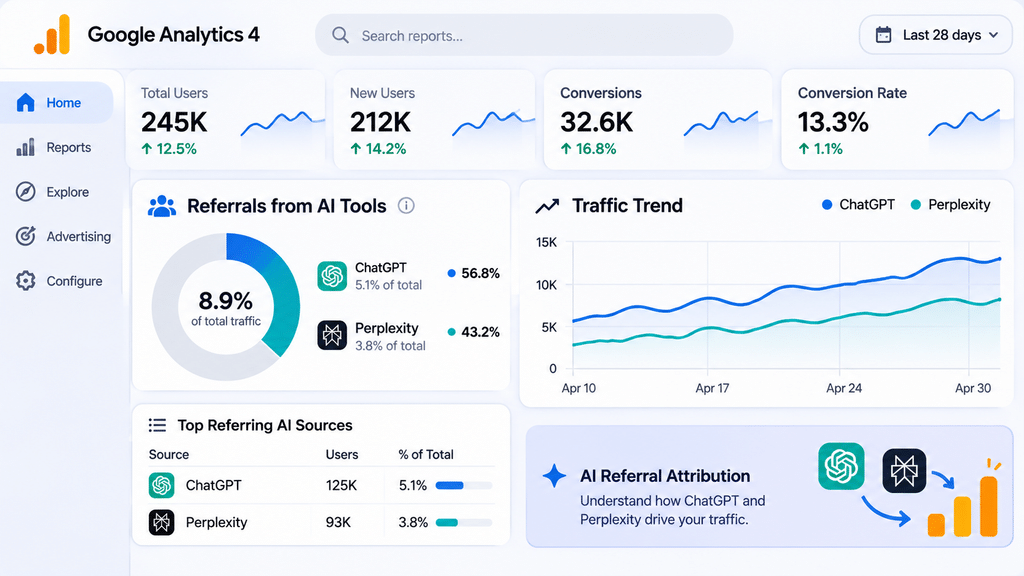
AI referral attribution is the gap sitting inside most marketing dashboards right now. You can see sessions arriving from ChatGPT or Perplexity, and your sales team keeps hearing “I found you on ChatGPT” on discovery calls, yet none of it connects to a clean lead source in your CRM. The visits are real, the conversions are real, and the credit is going to “Direct” or “Unassigned.”
The shift is not a fringe behavior anymore. In February 2024, Gartner forecast that traditional search engine volume would fall 25% by 2026 as AI chatbots and virtual agents take over some queries. It’s a prediction rather than a measured result, but the direction explains why more first touches now start inside an AI assistant instead of a search results page.
The measurement problem is structural. ChatGPT adds a utm_source=chatgpt.com tag to many of its links, but other assistants often pass nothing, and visits from apps or copy-pasted URLs arrive with no referrer at all. That is why your analytics shows only part of the picture.
This guide shows how AI referrals appear in analytics, how to spot dark AI traffic, and how to set up referral filters, a self-reported attribution field, and a monthly AI-traffic report. It’s written for marketing managers, SEO leads, and founders who need numbers they can defend.
What Is AI Referral Attribution?
AI referral attribution is the practice of identifying which visits, leads, and revenue originated from AI assistants and AI search tools such as ChatGPT, Perplexity, Gemini, Microsoft Copilot, and Claude. It combines analytics data (referrer and UTM signals) with what buyers tell you directly.
Neither source is complete alone. Analytics catches clicks that carry a referrer, while buyer self-reports catch influence that never produced a trackable click.
Why AI Referral Attribution Matters for Businesses
It matters because budget follows attribution. If AI-driven leads are hidden inside Direct traffic, you will under-invest in the content and entity work that earns AI citations, and you can’t show leadership that the channel is paying off.
It also changes how you read your other channels. Part of what looks like a brand or direct-traffic lift may be AI recommendation, so accurate AI referral attribution keeps you from crediting the wrong channel and cutting the right one.
How Do AI Referrals Show Up in Your Analytics?
By default, most AI visits show up in the Referral channel in GA4, labeled with the assistant’s domain. Common sources include chatgpt.com (older links used chat.openai.com), perplexity.ai, gemini.google.com, copilot.microsoft.com, and claude.ai.
Two quirks cause confusion:
- Partial UTMs: ChatGPT often adds
utm_source=chatgpt.comwithout autm_medium. When a source exists but no medium, GA4 can place the session in Unassigned, with the medium shown as “(not set).” - Channel order: GA4 evaluates channel rules in order. If your AI rule sits below Referral,
chatgpt.comvisits match Referral first and never reach it.
Check Reports > Acquisition > Traffic acquisition with Session source / medium as the dimension. Whether your property already shows an AI-specific channel varies, so verify before you build anything.
What Is Dark AI Traffic and How Do You Spot It?
Dark AI traffic is AI-influenced visits that arrive with no referrer, so analytics records them as Direct. It happens when someone clicks from a mobile AI app, copies a URL out of an answer, or opens a link in a privacy-focused browser.
You can’t count it directly, but you can detect its footprint:
- Direct traffic landing on deep pages. Real direct visitors mostly hit your homepage. Direct sessions landing on a specific blog post or solution page suggest a link was handed to them.
- Branded search lift. Buyers often see you in an AI answer, then search your name.
- Self-reported signals. Form answers and sales-call notes that mention ChatGPT or “AI” are the most direct evidence.
- Timing patterns. Direct spikes after you publish content that AI tools tend to cite.
Treat GA4’s AI numbers as a floor, not a total.
The 3-Signal AI Attribution Model
To keep this practical, use what we’ll call the 3-Signal AI Attribution Model. Each signal covers a blind spot in the others, and you only trust a conclusion when at least two agree.
| Signal | What it catches | Main blind spot |
|---|---|---|
| Referrer and UTM filters (GA4 custom channel) | Clicks from AI tools that pass a referrer or UTM | Misses app, copy-paste, and no-referrer visits |
| Self-reported attribution field | Influence from AI answers, including dark traffic | Relies on memory and honest answers |
| Landing-page and branded-search patterns | Indirect lift from AI visibility | Correlation only, not proof |
How Do You Set Up AI Referral Attribution Step by Step?
Set up AI referral attribution in three layers: filters in analytics, a field on your forms, and a recurring report. Plan on a few hours of work.
Step 1: Audit what you already get. In GA4, review Traffic acquisition by Session source / medium and list every AI source you see.
Step 2: Create a custom channel group. Go to Admin > Data display > Channel groups, copy the default group, and add a channel called “AI Referrals.” Set the condition to Session source matching regex: chatgpt\.com|chat\.openai\.com|perplexity\.ai|gemini\.google\.com|copilot\.microsoft\.com|claude\.ai
Step 3: Move it above Referral. Drag the new channel above Referral so it claims traffic first. Custom channel groups apply at report time, so this also reclassifies your historical data.
Step 4: Add a self-reported attribution field. Put an open-text “How did you hear about us?” on demo and contact forms. Open text beats a dropdown because buyers write “ChatGPT” or “Perplexity” in their own words. Pass the answer into a dedicated CRM field.
Step 5: Preserve the source with a hidden field. Capture the session’s source and landing page in hidden form fields so the AI source reaches the lead record before the CRM overwrites it.
Step 6: Build the monthly AI-traffic report. Once a month, pull the same metrics in the same order:
- AI sessions by platform and month-over-month change
- AI-sourced leads and conversion rate versus organic search
- Self-reported AI mentions from forms and sales notes
- Direct traffic to deep pages (your dark-traffic estimate)
- Top landing pages receiving AI visits
Review the self-reported answers alongside the analytics. When the two disagree, report both numbers and say which is which.
FAQ
What is AI referral attribution and why does it matter for B2B businesses?
It’s identifying which visits and leads came from AI assistants like ChatGPT and Perplexity. It matters because buyers increasingly research with these tools, and without attribution the resulting leads get credited to Direct or go uncounted.
How do I choose the right vendor for AI referral attribution within my budget?
Match scope to need: a one-time GA4 and CRM setup costs far less than ongoing reporting and analysis. Ask any vendor to show a sample monthly AI-traffic report and explain how they handle dark traffic, since a vendor claiming to measure it exactly is overpromising.
What checks should I do before outsourcing AI referral attribution?
Confirm they’ll work in your own GA4 and CRM accounts so you keep ownership of the data. Check how they handle consent and personal data, and get the report format and delivery schedule written down before work starts.
How long does AI referral attribution outsourcing typically take and what does it cost?
Initial setup usually takes two to four weeks, but self-reported data needs a couple of months to become meaningful. Costs depend on scope, from a modest one-time project to a monthly retainer for ongoing reporting.
Get AI Referral Attribution Set Up With MyB2BNetwork
If your team understands the model but doesn’t have analytics hours to build it, MyB2BNetwork can match you with vetted analytics and SEO partners who set up AI referral attribution in your own GA4 and CRM. You get comparable quotes across vendors before you commit.
Browse our GA4 and analytics specialists, or read our guide to SEO outsourcing to see how AI visibility fits a wider search strategy. If AI-sourced leads are arriving, vendor response time benchmarks show how quickly you should follow up.
How to Hire, Source, or Outsource AI Referral Attribution in the U.S.
U.S. teams that outsource this work include SaaS startups in Austin, fintech firms in New York, and B2B companies in San Francisco, each balancing speed against how much customer data a vendor touches. Two things matter most.
Choosing a vendor within budget. Scope drives price. A one-time GA4 channel and CRM field setup typically runs in the low-to-mid four figures, while ongoing monthly reporting with analysis more commonly falls in the roughly $1,500 to $5,000 per month range. Prioritize vendors who show a sample monthly report and are candid that analytics undercounts AI traffic. MyB2BNetwork can get accurate quotations for your specific scope.
Checks before outsourcing. Require access through your own GA4 and CRM accounts, and ask how the vendor handles personal data under CCPA and, for EU visitors, GDPR. A SOC 2 report or ISO 27001 certification is a reasonable baseline if they’ll touch lead records, and the NIST Privacy Framework is a useful reference for data-handling questions. Expect roughly two to four weeks for setup and a couple of months before self-reported data gives you reliable patterns.